Our Exclusive App

Download Savita Bhabhi & Velamma Comics App


Click On This Banner To Download


Download savita bhabhi comics app
Showing posts sorted by relevance for query comics. Sort by date Show all posts

Saturday, 20 April 2019

Two Simple Ways To Boot Safe Mode In Windows 8 & 8.1

Booting in Safe Mode in Windows 8 and 8.1

Booting in safe mode in windows 8 and 8.1 simply do not work by just pressing the F8 button while booting because the boot process is so fast it cannot detect any keystrokes made along the process. But do not worry about it because I am here to save you and will boot the PC right away without further ado. This process do not take a master to learn and do not need any special software to perform.
The following are the best and easiest two methods on booting in Safe Mode. Get Safe Mode without the following:


  • No CD/DVD needed
  • No Software to Install
  • No Hardware like USB Stick Needed


  • Method 1 – Using MSCONFIG.exe

    1.  Using msconfig.exe or microsoft configuration tool – this works in both 8 and 8.1.
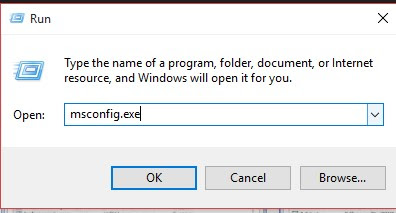


    • Simply go to run and type msconfig.exe and hit enter!
    • While in the msconfig windows to go boot and under the boot options below “tick” on Safe Boot and choose Minimal.

    • Click on “Apply“, If you need to perform the safe mode right away click on “Restart” and choose “Exit without Restart” if not.

    • Method 2 – Using Shift + Restart

      • The second and a very simple method is by pressing the Power Button and holding theShift Key on your keyboard and click on “Restart” Button
      • Windows will give more additional options when so, simply click on the Troubleshootoption.
      • Then go to Advanced Options.
      • Lastly, Press Startup Settings. Your PC will restart under safe mode options. Just click onRestart.
      • After restart you will need to choose among the available options from F1 to F9 to what boot to perform since this tutorial is for safe mode then click on F4.

      • Viola! You are done!
      So that’s how you boot in safe mode with Windows 8 and 8.1. That’s very easy isn’t it? I hope you find this tutorial very easy and please share to your friends. Thanks!

      Download Savita Bhabhi & Velamma Comic App By Clicking Below Banner It's Free:- 

      Download savita bhabhi comics app

      How To Track Lost Mobile Phone And Get It Back!!


      …or at Least Disable it!

      Yeah, yeah, I know it is very depressing losing your phone because it was robbed or you lost it. Luckily, there’s this amazing trick, method or however you want to call it where you can get it back or at the very least permanently disable it. Yeah because you do not want someone else is using it and viewing your precious private photos/videos or any files. Sounds really cool right? You know what’s even more cool? IT IS FREE TO USE! But has a little drawback just a little though.
      Recently, I just gave you a method the fun way on how to Freeze anyone’s mobile phone. This method is a little upgrade from that old post gives you a way to delete/recover your files images and videos, contact list, messages, call logs and more… from the lost phone and download them all in your local PC which uses a good internet speed and the lost phone must be connected with the internet which is unlikely to happens since it’s a lost phone lol. I highly doubt the one your robbed your phone at the one currently using it will connect it to internet without doing some precautionary measures. Or delete them all at once without a trace!

      Permanently Disabling your Lost Phone

      1. Using your Mobile Number – Yes with this method you can permanently disabled your lost mobile phone by just using your mobile number. Well, of course your sim card must be still active though and is in the phone.
      2. Using the IMEI Number – and good news, you can disable it using your IMEI number where just simply enter it on the software and click on find and disable button and you are good to go. Get that feeling that you have your phone disabled and no one can ever use it!

      Geo-Locate Your Mobile Phone

      Also, remember I told you earlier that you can get back your phone? Yes, because this little tool will help your locate your phone current location. By entering the mobile number or by usingIMEI number.
      Scenarios:


      • If GPS is turned off you can still locate it must be internet connected though.
      • If the phone is not internet connected you can still locate it with GPS turned one!


      • But has a little drawback as you could see the one using it must have been already disabled the location function or your phone is turned off already.you can locate it of course Geo Locationmust be turned on and the phone must be turned on as well. You can locate it throughout the globe wherever it is you can locate it! Full features listed below.

        Full Features:

        • Geo locate your Mobile Phone
        • Freeze/Disable the phone
        • Recover/Delete all files such as contact list, app list, apps, messages
        • No-app to install in the mobile phone
        • 100% Free to use for 1 year!
        • Working on Windows PC only

        Supported Phones

        • ALL PHONES as long as it has IMEI Number

        Screenshots and Instructions

        • Download TotalMobSecurity – Direct link download
        • Install the software on your Windows PC (Nothing to install on your mobile phone)
        • Open up the tool and Activate your 3 Months Trial by going to help>Activate Trial 3 Months
        • Enter either mobile phone or IMEI number
        • Click on Connect to get connected with the device.
        • It will locate the current location if GPS is enalbed
        • It will give you options to recover/delete your files
        • Location – The current location of your mobile phone using GPS
        • Recovery – Shows the number of files currently stored on your mobile phone – delete or recover.
        • Permanently Disabled – This will permanently disable your phone.
        • This feature is a little more secured you need to verify that you actually the owner of the phone by entering the phone model number and the IMEI no.
        • Click on Permanently Disabled All values
        • This disables all core functions such as start boot
        • Recover your pictures, videos, call logs, messages, contact list and more…
        Download TotalMobSecurity by Hackkaro.com

        This is by far the best cell phone tracking all-in-one solution tool for your needs! Also, you can locate anyone’s phone by using this tool just enter their phone number!….
        NOTE :- All Credit goes to Hackolo.com

        Download Savita Bhabhi & Velamma Comic App By Clicking Below Banner It's Free:- 

        Download savita bhabhi comics app

        Zip Bomb

        Will blow your mind.


        A zip bomb, also known as a decompression bomb ( or the 'Zip of Death'for the overly dramatic ones), is a malicious archive file designed to crash or render useless the program or system reading it. It is often employed to disable antivirus software, in order to create an opening for more traditional viruses. Rather than hijacking the normal operation of the program, a zip bomb allows the program to work as intended, but the archives is carefully crafted so that unpacking it (e.g by a virus scanner in order to scan for viruses) requires inordinate amounts of time, disk space or memory.


        The classic zip bomb is a tiny zip file, most are measured in kilobytes . However , when this file is unzipped its contents are more than what the system can handle (usually up to petabyte,i.e 1000 terabyte . Some go up to exabytes too ). Yes, we're talking about stuffing exabytes of data into kilobytes. In my view , this ingenious little trick is the product of "pure hacker mentality". In essence, it's nothing like phishing or sessio hijacking or anything else that has put a bad name to "hackers". It's a simple creative solution, an exploited loophole which truly shows: "Where there's a will, there's a way". To understand how it works, we have to take a little detour to see how data compression works (WinZip, WinRAR etc.)

        Various compression software and tools make use of what's called "Lossless compression algorithms". As the name suggests, these algorithms strive to compress files without any loss of information. Clearly, when we compress a file we'd definitely want to get back in the same shape after decompressing. These algorithms usually exploit statistical redundancy in such a way say to represent the sender's data more concisely without error. In English now: We know that the computer only understand 0's and 1's, So every single program or any data stored in your computer is actually just a series of 1's and 0's (Binary form). Let's take an example that's not entirely correct but will help you understand the principle. Say, we've got a file which after being converted to binary language looks like "1110000101". Remember statistical redundancy that was mentioned earlier? Try to spot it in this string (1110000101). Statistical redundancy basically means that the same thing is repeated over and over again. In this string we see that there are three 1's followed by four 0's. Now take a look at this string: "3140101". What just happened here is compression. We can simply write a program that codes and decodes files as above (Softwares like WinZip use a fancy form and overly complicated form of what we did above). If the program finds repeating patterns, like a lot of 1's together, it may simply replace all those 1's by another number. Another example, we find "111111111"somewhere in a program. That's nine 1's in a row. What if we replace a "91"by writing "1"nine times, effectively reversing the process. Again, while decoding, if the program encounters any number other than 1 or 0, in our case 9, it can be instructed to write the successive number, in our case 1,9 times. So "91"gets converted back to "111111111". That's lossless compression.

        What about the previous string (3140101)? On uncompressing this, we get back 1110000101, that is, the original string. Like I said, this example is not entirely accurate. Note that the computer only understands binary. Everything that you'll ever do on a computer will have, at some point, been converted to binary form. Actually the computer is forced to convert to something other than binary (like english) only for us, dumb humans. We compressed "111111111"by writing "91". But the "9"in the "91"will also have to again be converted into 1's and 0's. So our program is quite buggy. Widely used programs like Winzip, WinRAR, PowerISO etc. use various different algorithms for different cases.

        Lossless compression is possible because most real-world data has statistical redundancy. Lossless compression schemes are reversible so that the original data can be reconstructed. However, lossless data compression algorithms will always fail to compress some files. Indeed, any compression algorithm will necessarily fail to compress any data containing  no discernible patterns. Attempts to compress data that has been compressed already may actually result in an expansion, as will attempts to compress all but the most trivially encrypted data. This is why if you've ever tried "ZIPing" or "RARing"a file, you would have noticed in some cases it works great while in other cases it may not even reduce the file size by 5%. (WinRAR and WinZIP can be considered the same for (almost) all practical purposes. Their names differ more than their compression abilities. Fell free to use either.)

        Now, back to zip bombs. Before taking a deeper look, let's get the basic meaning cleared up. Take a new text file and write '0' a 1000 times. Save it, the file size should be just around 1 kilobyte. Open it up, CTRL+A, CTRL+C, CTRL+V - i.e, copy the whole thing then paste it. Do this ten times. Our file is now around 10kb, and completely made of 0's. Do this a few more times. Faster than your expectations, the file size will quickly climb into megabytes and then gigabytes. In most cases, the notepad (or any text editor) will actually begin to lag since it has a ridiculous amount of 0's open in the window. When that happens, that's your cue to slow down since different operating systems and softwares can have unexpected behavious when dealing with such a large files. Practically, just keep it under a few gigabytes and you should be fine.
        (Even this may be too much for some systems, I recommend pausing at about a 100 MB and then slowly increasing the size. If the lag lasts longer than around 15 seconds, you've reached the limits.) So, we have a 5Gb text file (on an awesome computer) containing nothing but 0's. A little perspective: That's over five-freaking-billions zeros that innocent little notepad obediently handled in a few seconds. So the next time you're getting annoyed at your browser lagging a little bit, try taking a notebook and write down 5Gb worth of text. It's only fair.

        And we're back. what do we do now with that ridiculously large text file? Compress it and watch your seriously underappreciated computer do magic. In the same directory, you'll now see the pointlessly large text file, and alongside it, a zip file that should be under 1 Megabyte. That's like stuffing 5000 balls into the volume of one.

        Now, for a deeper look let's check out the most famous zip bomb, the 42.zip file. It is a zip file consisting of 42 kilobytes of compressed data, containing five layers archive containing a 4.3 gigabyte (4 294 967 295 bytes; ~ 3.99 GiB) file for a total  of  4.5 petabytes (4 503 599 626 321 920 bytes; ~3.99 PiB) of uncompressed data.This file is still available for download on various websites across the internet. In many anti-virus scanners, only a few layers of recursion are performed on archives to help prevent attacks that would cause a buffer overflow,an out of memory condition, or exceed an acceptable amount of programs execution time. Zip bombs often (if not always) rely on repetition of identical ratios. Dynamics programming methods can be employed to limit traversal of such files, so that only one file is followed recursively at each level - effectively converting their exponential growth to linear.

        (Here's a small website dedicated solely to the 42.zip, Download 42.zip . You can ven download a ready-made zip bomb from here. Password for the zip file is '42'. The file has a password to protect users who have ancient antivirus software that is set to automatically scan all downloads)

        Now, to avoid giving the wrong impression a myth needs to be bested. "Zip Bomb" is not a very accurate name for this malicious file. If you extract a zip-bomb, it won't do anything to your to your computer though, it'll just create 16 smaller zip-bombs. If you decompress one of those it'll yield 16 more zip-bombs. As such, they're not going to ëxplode"when someone opens them, they're just used by malware authors to knock-out anti-virus software so malware can work without needing to watch its back. What happens is, a malicious program may plant a zip-bomb somewhere near it as bait for AV software. The program will wait until the anti-virus comes up for a routine scan, and it'll wait, "hiding"behind the zip-bomb. When the anti-virus reaches the bomb, it'll try to open it, all in its limited memory. 1 file becomes 16, which becomes 256, and it goes on until the memory is full. In reality though, the computer never runs out of memory because each process is only allowed to use so much memory, after it hits its limit it crashes itself to protect the rest of the computer from an OOM(Out-Of-Memory) event. When this happens to an anti-virus program as it's trying to dig into the file for malware, the software simply crashes and exists, while leaving the rest of the computer unharmed. The malware will detect this, and will then use that opportunity to do whatever it wants, without having to worry about AV software that might be right around the corner. Additionally, the nested archives make it much harder for programs like virus scanners (the main target of these "bombs") to be smart and refuse to unpack archives that are "too large", because until the last level the total amount of data is not "that much", you don't "see"how large the files at the lowest level are until you have reached that level, by which time it is, of course, too late. However, most anti-virus software today recognizes a zip-bomb when it sees one, and will skip over it, alerting the user that the computer might be infected with malware. They usually go down to the second or third level before flagging the file.

        The 42.zip is just one example, there are many more like this and you can create your own. A similar file is an XML-based decompression bomb called "billion laughs"(or XML Bomb). Basically it crashes a web browser by causing the XML parser to run out of memory (Again, most browsers today will detect such recursive expansion and simply not try to parse the booby-trapped XML).

        There's even a torrent for one of the largest (and smallest) zip bombs on the internet although it seems all the seeders have long gone. It's a 5.61 kilobyte zip file that expands to 4 Zettabytes. It seems to be at the absolute limit of zip-bombs. Here's the Link  (As a challenge, you can try replicating it. The file structure has been explained in the link: 8 layers, 32 archives in each layer, each archive containing a 4Gb file)

        Let's walk through the process once again. Make a 4Gb text file full of 0's. Zip it. Let's call it zip1. Create, say 10 copies of this zip file. We have 10 zip1's. Now, zip all ten zip1's again. Call it zip2. We're at the second level now and we can simply continue the process for as long as we like and the zip file will just keep getting bigger and bigger. A common doubt is, How can we create a zip file that opens up to a 4 zettabyte size without having 4 zettabyte memory on our computers?
        Actually, we don't even need 10 Gb for this. We just took a 4 Gb text file and zipped it (into zip1). We can simply delete the original text file as it is no longer required. All we need is the first single tiny zip file and it is of this zip file that we create more copies, zip them up, create more copies and zip again and so on.

        And that ends the story of the zip bomb. These actually come under the class of logic bombs, which also contains the fork bomb we made using batch files. Yet again, the same DDOS is going to pop up here. Zip bombs are basically DDOSers for antiviruses. Limited memory is 'flaw' that has remained in all computers since their inceptions and hackers always find a way to exploit it. When the old methods stop working, new ones soon pop up and take their place. DDOSing, Zip Bombs, Fork Bombs, PDF bombs, buffer overflows and what not. This shows what a crucial part of programming 'memory management' really is. And so, we live another day, ready to combat the next problem.

        Read this :- Phishing


        Download Savita Bhabhi & Velamma Comic App By Clicking Below Banner It's Free:- 

        Download savita bhabhi comics app